Black Friday represents the most critical shopping event of the year for online retailers. However, standing out in crowded inboxes during this peak shopping period requires more than generic promotional emails.
Your WooCommerce email strategy can make or break your Black Friday success. While most store owners focus on discounts and promotions, the real competitive advantage lies in how you customize WooCommerce emails to create memorable brand experiences that drive conversions.
This comprehensive guide reveals proven strategies to customize WooCommerce emails for Black Friday campaigns, ultimately helping you transform default templates into revenue-generating powerhouses that capture attention and convert browsers into buyers.
Spark Editor lets you design stunning, branded Black Friday emails in under 30 minutes! without any coding skills
Why Customizing WooCommerce Emails for Black Friday Matters
The numbers tell a compelling story about email’s dominance during Black Friday. 59% of US consumers reported email marketing influenced their purchasing decisions, making it the most effective channel for driving holiday sales.
Yet here is the paradox: 60% of marketers send multiple emails between Black Friday and Cyber Monday, creating intense inbox competition. Generic, unbranded emails simply vanish into the noise. Your customers receive dozens of promotional messages daily during this period, and default WooCommerce templates will not capture their attention.
Consider this powerful statistic: customizing WooCommerce emails can result in 6 times higher conversion and click-through rates, with open rates jumping by up to 50%. That kind of performance difference directly impacts your bottom line during the most lucrative shopping weekend of the year.
The transformation happens because customized emails accomplish three critical objectives:
- Build Brand Recognition: Consistent visual elements across every customer touchpoint strengthen brand memory. When customers see your logo, colors, and distinctive design elements in their inbox, they instantly recognize your store among competitors.
- Establish Trust: Professional, polished emails signal credibility. Customers feel more confident completing purchases when emails match your website’s appearance and maintain consistent branding throughout their shopping journey.
- Drive Higher Engagement: Personalized content based on customer behavior, purchase history, and preferences creates relevant experiences that command attention and inspire action.
To learn the exact steps and tools you need, explore our guide on how to Customize WooCommerce Emails effectively.
Understanding WooCommerce Email Types for Black Friday
Before diving into customization techniques, you need to understand which emails require optimization for Black Friday success.
Transactional Emails
These automated messages form the backbone of your customer communication. Transactional emails have an open rate of 80-85%, while most marketing emails only average around 20-25%. This massive difference makes transactional emails prime real estate for Black Friday optimization.
Key transactional emails to customize:
- Order Confirmation Emails – Sent immediately after purchase completion
- Processing Order Emails – Notify customers when orders move into fulfillment
- Completed Order Emails – Confirm successful delivery
- Refund and Cancellation Emails – Handle post-purchase changes
- Customer Invoice Emails – Provide detailed purchase records
Each transactional email presents opportunities to reinforce your Black Friday messaging, suggest complementary products, and encourage repeat purchases.
Marketing Emails
These promotional messages drive awareness and urgency for your Black Friday deals:
- Pre-Black Friday Teasers – Build anticipation in the weeks leading up to the event
- Early Access Emails – Reward loyal customers with exclusive preview access
- Flash Sale Notifications – Create urgency with limited-time offers
- Abandoned Cart Recovery – Capture lost sales with personalized reminders
- Post-Purchase Follow-ups – Drive additional sales after initial conversions
How to Customize WooCommerce Emails for Black Friday
Method 1: Using Built-In WooCommerce Settings
WooCommerce provides basic customization options without requiring plugins or coding knowledge. While limited, these settings establish foundational branding.
Access Email Settings:
- Navigate to WordPress Dashboard
- Click WooCommerce in the left sidebar
- Select Settings from the dropdown
- Click the Emails tab at the top
Customize Global Elements:
Changing these options will update all of your email templates at once, making this approach efficient for consistent branding.
Method 2: Using Plugin Method – Spark Editor
Before Starting, Let’s Ask: Why Use Spark Editor for Your black Friday WooCommerce emails?
Managing WooCommerce email notifications can be tricky if you rely on default settings, but with Spark Editor’s drag-and-drop builder, you can create professional, on-brand new order email templates in minutes without touching a single line of code.
Here’s how to set up custom WooCommerce emails using Spark Editor:
- Install and activate Spark Editor: First, ensure that Spark Editor is installed and activated on your WooCommerce store. Once active, navigate to Spark Editor.
- Select the email template you want to customize: Next, in the emails section, locate the template of your choice and then click on the template.
- Open the template of your choice: Finally, this option will open the Spark Editor interface, where you can now modify the content and layout of your new order email.
- Example customization step
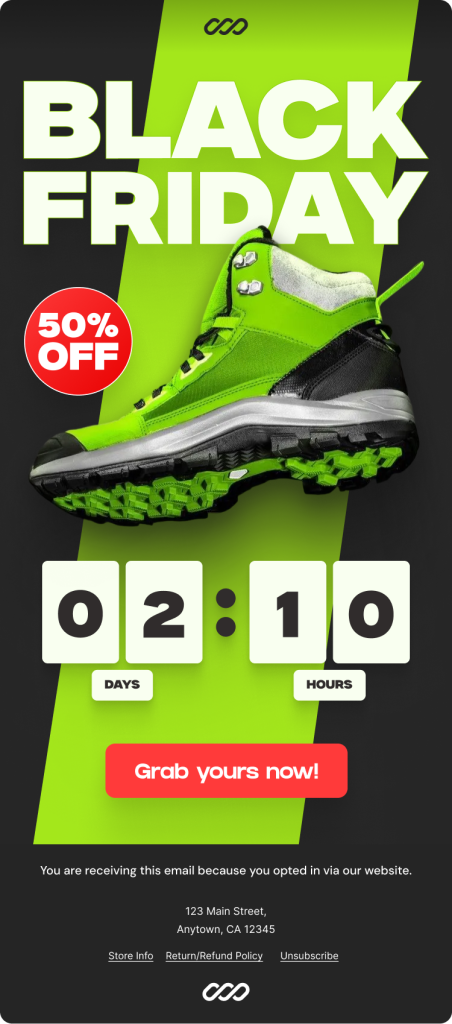
Bold Header Design
- Dark background (black/charcoal) setup
- Large “BLACK FRIDAY” text (60-80px, white)
- Diagonal lime green accent stripe
- Logo placement at top
Hero Product Image
- Single large product photo (400-500px)
- Positioning on/over accent stripe
- Red “50% OFF” circular badge placement
- Professional product photography tips
CTA Button
- Large red button: “Grab yours now!”
- 300px × 60px, pill-shaped
- High contrast on dark background
- Positioned below countdown
Color Scheme
- Black Background: #262626
- Lime Green: #A4E71B
- Red highlights: #FF3A3A
- White Text: #F9FFF0
- Complete color psychology breakdown
Minimalist Footer
- Dark background matching header
- Opt-in text
- Address (CAN-SPAM compliance)
- Footer links (Store Info, Return Policy, Unsubscribe)
- Logo at bottom
Final Polish
- Save your changes: After customizing the email to your liking, simply save the template, and the new settings will be applied to your email going forward.
- Preview the final result: Finally, here is the final example Black Friday email that the customer will receive.
Ready to boost your Black Friday sales with professional emails? Spark Editor makes it easy. Grab it now and start creating!
Essential Elements of High-Converting Black Friday WooCommerce Emails
Mobile-First Design
Mobile commerce dominates Black Friday shopping. The responsive design becomes non-negotiable when you consider that smartphone users expect seamless experiences across all devices.
Responsive email design increases mobile clicks by 15%, directly translating to higher conversion rates during Black Friday. Your WooCommerce email templates must adapt flawlessly to various screen sizes.
Key mobile optimization strategies:
- Use single-column layouts that stack vertically on mobile devices
- Implement touch-friendly buttons (minimum 44×44 pixels for easy tapping)
- Optimize images for fast loading on mobile networks
- Test emails across multiple devices and email clients before deployment
- Keep subject lines under 40 characters for full mobile visibility
Persuasive Copywriting
Your email copy must cut through Black Friday noise with clear value propositions:
Subject Lines That Convert: Black Friday emails with a visually appealing design have an open rate 10% higher than emails with a poorly designed email. However, design alone will not save weak subject lines.
Effective Black Friday subject line formulas:
- Urgency-driven: “Last Chance: 70% Off Ends Tonight”
- Exclusivity-focused: “VIP Access: Shop Before Everyone Else”
- Benefit-oriented: “Save $500 on Best-Sellers Today Only”
- Question-based: “Ready for Our Biggest Sale Ever?”
- Personalized: “[Name], Your Exclusive Black Friday Code Inside”
Body Copy Best Practices:
- Lead with benefits, not features: First and foremost, focus on what customers gain rather than technical specifications.
- Create urgency with countdown timers and limited quantity messaging: Additionally, use time-sensitive elements to encourage immediate action.
- Use social proof through customer reviews and bestseller indicators: Furthermore, build trust by showcasing what others have purchased and loved.
- Keep paragraphs short (2-3 sentences maximum): Similarly, ensure readability by breaking content into digestible chunks.
- Include multiple CTAs throughout longer emails: Finally, provide several opportunities for customers to take action as they read through your message.
Want to level up your overall email strategy? Explore these powerful Ecommerce Email Marketing Tips you may be missing.
Advanced Personalization Strategies for Black Friday WooCommerce Emails
Personalization transforms generic promotions into relevant experiences that drive conversions.
Dynamic Content Based on Customer Behavior
Ultimately, dynamic content allows you to tailor your emails based on customer behavior, preferences, and previous interactions, thereby creating highly targeted Black Friday campaigns.
Purchase History Segmentation
- First-time buyers: Welcome series with introduction to product range
- Repeat customers: Loyalty rewards and exclusive early access
- High-value customers: Premium product recommendations and VIP perks
- Category buyers: Products from their preferred categories
Engagement-Based Segmentation
Black Friday emails sent to subscribers who have opened previous emails from your brand have an open rate 10% higher than emails sent to subscribers who have never opened an email from your brand.
Target highly engaged subscribers with:
- Early bird specials
- Extended sale periods
- Exclusive discount codes
- Limited edition products
Send dormant subscribers
- Re-engagement campaigns with aggressive discounts
- “We miss you” messaging with special comeback offers
- Product category surveys to understand preferences
Behavioral Triggers
- Send first reminder within 1 hour highlighting items left behind
- Follow up after 6 hours with urgency messaging about limited stock
- Send final reminder after 24 hours with additional discount incentive
- Include one-click checkout links to reduce friction
Product Recommendation Engine
Leverage WooCommerce data to suggest relevant products:
- Cross-Sell Recommendations: Include complementary products in order confirmation emails. If a customer purchases a camera, suggest memory cards, camera bags, and cleaning kits at Black Friday prices.
- Upsell Opportunities: First, present premium alternatives or upgraded versions in processing and completed order emails. Additionally, maintain relevance by staying within the same product category.
- “Frequently Bought Together” Bundles: Similarly, analyze purchase patterns to create curated product sets. Then, display these bundles in post-purchase emails with special Black Friday bundle pricing.
Creating Urgency and FOMO in Your Black Friday WooCommerce Emails
Psychological triggers drive immediate action during limited-time events.
Countdown Timer Implementation: Visual countdown timers create tangible urgency. Several methods exist for adding timers to WooCommerce emails:
Email-Safe Static Timers: Generate countdown images that display time remaining when emails are opened. Services like Sendtric or MotionMail automatically update images based on the recipient’s open time.
Dynamic HTML Countdown: Some email clients support CSS animations for live countdowns. However, test extensively as support varies across providers.
Deadline Messaging: Even without technical countdown timers, clear deadline communication drives urgency:
- “Sale ends tonight at midnight EST”
- “24 hours left for 70% off”
- “Final hours: Black Friday ends in X”
Scarcity Tactics
Inventory Counts: Display remaining stock numbers for popular items
- “Only 7 left in stock”
- “Limited quantities available”
- “Almost sold out”
Social Proof Indicators: Each product image displayed the total number of clicks, positioned as “Join X people shopping”, leveraging FOMO effectively.
- “500+ people viewing this item now”
- “328 units sold in the last hour”
- “Bestseller: 2,000+ orders this week”
Limited-Time Offers: Structure your Black Friday campaign in phases:
- Thursday evening: Early bird access for VIP customers
- Friday morning: Main sale launch
- Friday afternoon: Lightning deals rotating every hour
- Friday evening: “Last chance” messaging
- Saturday-Monday: Extended Cyber Week deals with adjusted messaging
Final Thoughts
Black Friday is a huge opportunity for WooCommerce stores, and your email strategy decides whether customers notice your offers in the chaos. Customized, branded emails help you stand out, build trust, and boost conversions.
Start personalizing your WooCommerce emails now to create impactful, mobile-optimized messages that turn subscribers into loyal customers. Remember, your biggest Black Friday wins begin in the inbox, so make every email count.
Also Read
Frequently Asked Questions
Can I customize WooCommerce emails without coding? Yes! Plugins like Spark Editor, FunnelKit, and MailPoet offer drag-and-drop editors that require zero coding knowledge. You can create professional Black Friday emails in minutes by simply clicking, dragging, and customizing pre-made elements.
Will my customized Black Friday emails work on mobile devices? Absolutely! Modern email customizer plugins automatically create responsive designs that adapt to any screen size. Always preview your emails on mobile before sending (64% of Black Friday emails are opened on phones!). Use the mobile preview toggle in your editor to check.
Can I switch back to my regular emails after Black Friday ends? Yes! When customizing, save your Black Friday design as a new version/template. After November 29th, simply reactivate your original template. Most plugins like Spark Editor have version history that lets you restore previous designs with one click.
Do I need a paid plugin to customize WooCommerce emails for Black Friday? Not necessarily! Spark Editor has a free version with solid customization features. WooCommerce also has built-in settings for basic changes (colors, logo, footer). However, paid versions (starts at $45/year) offer advanced features that can significantly boost conversions.
How do I test my Black Friday emails before sending to customers?
Follow this checklist:
• Use the “Send Test” feature to email yourself
• Test on multiple devices (phone, tablet, desktop)
• Check different email clients (Gmail, Outlook, Apple Mail)
• Click every link to verify they work
• Review on actual mobile device, not just preview
Pro tip: Send tests to 3-5 different email addresses on different platforms.